
Image Output
Requirements for
Video & Print
Understanding resolution, megapixels, and storage requirements before you shoot saves time, money, and painful compromises in post production.
Understanding image output requirements ensures you select the right equipment for capturing video and photographic content, and helps properly estimate the storage and post production resources needed to deliver a quality product.
This post came out of a real project: delivering videos and photographs for a marketing campaign that needed to work both online and in print. What started as a procurement exercise turned into a thorough review of where video and photography standards actually stand.
The State of 4K Video
If you're planning a shoot or evaluating a video marketing investment, 4K is likely on your radar. Over the past several years it has moved from a premium format to a mainstream expectation. YouTube began supporting 4K at 60fps uploads in 2013 and 8K uploads in 2015. Adoption has been accelerating ever since.
The appeal is obvious. The challenge is practical. One minute of uncompressed 4K video is 32GB. Twenty minutes of 1080p footage encoded in Apple ProRes 422 HQ consumes roughly 20GB of storage. The same 20 minutes at 4K balloons to approximately 200GB. A multi-day shoot with interviews and B-roll can easily generate several terabytes of raw files before a single edit is made.
For this project in early 2018, none of the existing cameras or drones in the inventory could capture 4K. After estimating the full cost — equipment, storage, and editing infrastructure — the decision was made to standardize on Full HD (1920 × 1080) for this production cycle, with a clear plan to move to 4K in the near term.
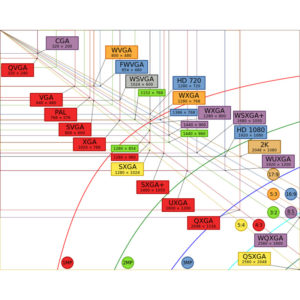
Video Format Resolution Compared
The graphic below puts the major video formats in perspective. The difference in pixel area between HD and 4K is substantial — and the jump to 8K even more so. Format selection directly affects every downstream decision: storage infrastructure, editing hardware, and delivery pipeline.

Megapixels & Print Quality
For projects where photography will be used in print campaigns, resolution requirements are non-negotiable. The key constraint: images must be captured and stored at sufficient resolution to support the target print size and DPI without upscaling or pixel interpolation.
Most professional print publications require 300ppi for photo quality output. High-end print campaigns and fine art reproduction typically require 600ppi. The table below maps megapixel counts to viable print sizes at each DPI target.
| Megapixels | Pixel Resolution* | Print @ 600ppi | Print @ 300ppi | Print @ 150ppi** |
|---|---|---|---|---|
| 3 | 2048 × 1536 | 3.41" × 2.56" | 6.82" × 5.12" | 13.65" × 10.24" |
| 4 | 2464 × 1632 | 4.12" × 2.72" | 8.21" × 5.44" | 16.42" × 10.88" |
| 6 | 3008 × 2000 | 5.01" × 3.34" | 10.02" × 6.67" | 20.05" × 13.34" |
| 8 | 3264 × 2448 | 5.44" × 4.08" | 10.88" × 8.16" | 21.76" × 16.32" |
| 10 | 3872 × 2592 | 6.46" × 4.32" | 12.91" × 8.64" | 25.81" × 17.28" |
| 12 | 4290 × 2800 | 7.15" × 4.67" | 14.30" × 9.34" | 28.60" × 18.67" |
| 16 | 4920 × 3264 | 8.20" × 5.44" | 16.40" × 10.88" | 32.80" × 21.76" |
| 20 (35mm film, scanned) | 5380 × 3620 | 8.97" × 6.03" | 17.93" × 12.06" | 35.87" × 24.13" |
| 24 | 6016 × 4016 | 10.03" × 6.69" | 20.05" × 13.39" | 40.01" × 26.78" |
| 36 | 7360 × 4912 | 12.27" × 8.19" | 24.53" × 16.37" | 49.06" × 32.74" |
* Typical resolution. Actual pixel dimensions vary by camera model.
** At 150ppi, printed images will show visible pixels and fine detail will appear soft.
Megapixels Required by Print Size
The chart below visualizes the relationship between print dimensions at 300ppi and the megapixel count required. The numbers inside the colored boxes represent megapixels. One key pattern: as print size doubles, the megapixel requirement increases geometrically, not linearly.

"You can make a print any size. The question is whether it will be true photo quality — and that answer lives entirely in your original capture resolution."
A 6 or 8 megapixel camera produces excellent 8" × 10" prints. A true photo quality 16" × 20" print requires between 24 and 30 megapixels. Manufacturer claims that an 8 megapixel camera can produce a quality 16" × 20" print are technically possible but practically misleading — the result will not meet professional print standards.
Define Output Requirements First
Identify every final deliverable — web video, broadcast, digital print, large format — before selecting any equipment. Output drives all other decisions.
Calculate Storage Requirements
Estimate total shoot duration, multiply by per-minute file sizes for your chosen codec and resolution, then add a 30% buffer. Cloud and local redundancy should both be planned before the shoot begins.
Audit Existing Equipment
Confirm that cameras, drones, and capture devices can actually record at the required format. A 4K output requirement that your existing gear cannot meet means a full equipment refresh — budget accordingly.
Spec Post Production Infrastructure
Editing 4K or larger footage demands significantly more CPU, GPU, and RAM than HD. Ensure your editing workstations and software are capable before committing to a format.
The Bottom Line
Working through this analysis made it possible to set clear capture standards, right-size the equipment investment, and accurately plan storage and editing infrastructure from the start. The alternative — discovering resolution or storage gaps mid-production — is expensive and often forces compromises that affect final quality.
4K video and high-megapixel photography are not future concerns. They are current production standards. Planning for them before a shoot is a straightforward exercise that pays for itself many times over.
Know your output requirements before you capture a single frame. Everything else — equipment, storage, editing infrastructure — follows from that single decision.